Wednesday, October 31, 2012

"Family Meal Time" - Road Trip with Stuff to Scrap

I was running late getting my preview posted this month, but the Stuff to Scrap Road Trip was good enough to tag me onto the end!  As I have been doing of late, I have some fun patterned papers to go with the color scheme.  Thanksgiving and Christmas are absolutely my favorite time of year, and I love this theme and color palette for November!

Click on the image to download from Mediafire.  PU/S4H/S4O.

Here's another link, for 4shared:  http://www.4shared.com/zip/bfXHRtls/NoteScr_-_Family_Meal_Time.html.  I apologize for any problems anyone has had downloading from Mediafire.


Happy November!

Here are the rest of the stops if you missed any along the way:
Shuckclod's Stuff
DinkeeDoo Scraps
Desert Digi Scrap Gal
AK Designs
The Scrappy Kat
Karen Diamond Designs
Scrappin Serenity
Manda Lane Scraps
KapiScrap & Art
Digi-Designs by Nicole
Designs by Snowlady
kana
Saphira's Scraps
Queen Bee Scraps
Callaluna Creations
Mommy Me Time Scrapper
Growing Pains Scrapped
DoubleTrouble Scraps
WinksArt Graphics
Sairi Designs
Digital Scrapbooking Resource Center
Scraps by Missy
Note-able Scraps

Saturday, October 27, 2012

Coupon Code for KinderBach!


In case you missed it in the Review update, KinderBach is offering the Schoolhouse Crew Blog Readers a coupon for 30% off any order!

Coupon Code:  TOS_crew2012 
Expires: 12/31/2012

If you've been wanting to try KinderBach online beginning piano lessons, now may be the time!

If you missed the review, read it here.

Free Patterned Papers for "Mystery Machine"

Last October, we had a fun palette for the Stuff to Scrap Road Trip based on everyone's favorite dog, Scooby-Doo.  These colors are great for scrapping your little monsters!  Here are some free patterned papers based on the same color scheme.  Click on the image to download from Mediafire.  PU/S4H/S4O.


If you missed the Road Trip last October, the papers I made then are still available.  Click the image below.


Happy Scrappin'!


Schoolhouse Review: Samson's Classroom


I've said "just a few" times that my kids love learning with games, and I love using them for teaching!  Samson's Classroom is a fun learning website for early language arts.  While some learning websites have so many games that you wonder if the kids are learning anything, and others are straight learning so that the kids do not perceive them as "fun," in Samson's Classroom, the learning itself is the game.  There is just enough "education" for me, and just enough "fun" for my kids!


Samson the Dog helps kids practice sight words, spelling, and reading.  


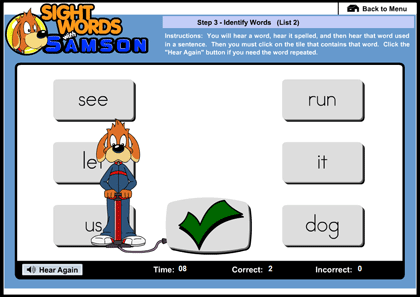
In the Sight Words section, your child works through four levels of seven "sight words" lists each.  Each list is learned in five steps.  The first step is simply studying the words on the list.  The student looks at each word, watches it being spelled, listens to the pronunciation and spelling, and listens to a sentence with the word in it.  In any of the study sections on the site, the student may stay on a word as long as he needs, or move forward whenever he is ready, which I really appreciate, because it is difficult to get my son to work on things when they move either too quickly or too slowly for him and he gets frustrated.  In Step 2, the student listens to the word being spelled, then clicks on the proper letters, in order, to spell it himself.  In Step 3, the student identifies the words as they are spoken and used in a sentence.  In Step 4, the student again clicks on letters to spell each word, but this time, the word is used in a sentence but not spelled out loud.  In addition, all the letters in the alphabet are provided as choices, rather than just a few of them.  Step 5 again involves identification of the words, and some choices given are incorrect spellings of that word.  By the time your child finishes all five steps, he or she has mastered that list of sight words and is ready to move onto the next list.  While working through the lists, the student also works through different colors of karate belts, so that when she is done, she will hold a black belt in sight words!


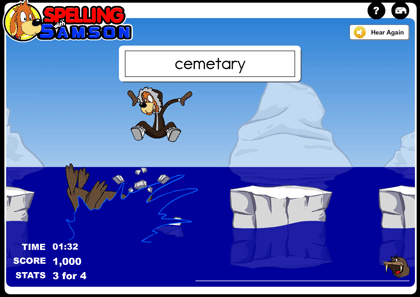
In the Spelling section, the parent/teacher may put in her own lists of spelling words.  If you want to use any spelling words that are not recognized in the program (for instance, I made a list of the books of the New Testament for my daughter to learn to spell, some of which were recognized and some were not), you may request that the words be recognized and submit your list for review.  Again, the first step for the student is to study the words on the list, which may be done on the computer, or there is an option to print the list out.  There are then three games to help the student first fill in missing letters, then collect letters and put them together, and finally spell the whole word on his own.  The games are fun and move fairly quickly to hold interest.  If you are not quick enough, you can be caught in a spider web (that happened to me a lot!) or tackled by a walrus and turned into an ice cube!  Also, you compete against other people in your classroom (or homeschooling family) for the highest scores and Championship Belt.  The parent can also play in order to give some healthy competition!


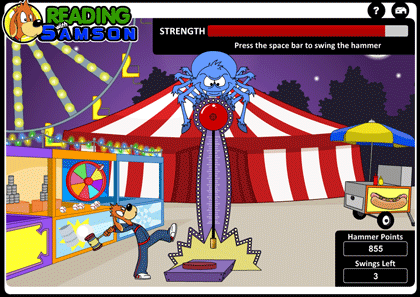
The final section is Reading.  I had my 4th-grade daughter work through this one so I would be able to review it, as my 2nd-grade son is still working on his Sight Words black belt and the Spelling.  I think he could do the Reading section as well, as he is actually a pretty good reader, but he is working through the games more slowly.  In the Reading section there are four levels.  In each level, you select each passage, read it, then answer the questions about it.  Some are direct questions and some are based on inference.  As someone has pointed out, the reading comprehension section is a great preparation for standardized testing.  Mastering the reading passages earns the student "Hammer Time swings."  The Hammer Time game then awards "Hammer Points," which may be compared against the "Top 5" scoreboard.


Samson's Classroom offers a number of resources to the parent/teacher.  In addition to being able to produce your own spelling lists for the games in the Spelling section, there are articles about literacy and learning, printable awards and certificates to be given to students, included lesson plans, and printable PDF worksheets.  I love the resources for playing Bingo or Sight Words Baseball.  You can see your students' progress and also how many attempts it took them to master the problems from your dashboard.

Samson's Classroom is recommended for children in the K-5th grade reading level.  Sight Words is geared more to the younger end of the age range, while Reading Comprehension is geared more towards the upper end of the range.  I allowed my 4th-grade daughter to skip the Sight Words section, as it would be quite easy for her, and she completed all 4 levels of the Reading Comprehension section in about 2 days.  I can still use the Spelling Section for her throughout the year as a fun way to practice her new spelling list each week, which is a great tool.  Other than that, though, the program is a bit easy for her. It is a fantastic program for my 2nd-grader, who is still working on his Sight Words black belt and the Spelling section.  I believe it will take him the full year to finish the whole program.  As I was sitting here writing the review today, he tried to kick me out of the computer chair so that he could play the game!

I highly recommend Samson's Classroom for kids in the K-3rd grade reading level, and higher if they enjoy these types of games and would like to use them for spelling words and reading comprehension practice.

Here's the basic info:

Product:  Samson's Classroom subscription website (works with Mac or PC)
Ages:  K-5th grade reading level
Price:  $30/year for one user or $50/year for a family plan (up to 4 students).  There are also school and classroom plans available.

To see what my fellow Crewmates thought of Samson's Classroom, click the banner below.

Photobucket
Disclaimer:  I received a free subscription to Samson's Classroom in exchange for a fair review.  No other compensation was given, and all opinions are my own.

Happy Hallowe'en by Dandelion Dust Designs

The big costume and candy day is coming fast upon us!  We normally do not celebrate Hallowe'en, but some years we have done some things like the "Candy Carnival" for which we were dressed up below:


Whatever your traditions, you can pick up this fun-colored kit exclusively at ScrapTakeout.  I love the fact that it has complementary greens and purples in addition to the orange and black.


Here are some free QPs.  Click on the images to go to Mediafire.  P/U only.


Happy Fall Y'all!

Disclaimer:  I received a free copy of this kit in exchange for LOs.


Friday, October 19, 2012

Schoolhouse Review: WealthQuest for Teens


I heard a speaker say recently that when people seek counseling for major problems in their lives, the problems almost always revolve around s*x or money.  I've also been told that money problems are at the root of most marital fights and divorces.  So why aren't we teaching our teenagers more about money before they get out on their own?  Matthew 10:16 tells us to "be as shrewd as snakes and as innocent as doves" when dealing with the world.  In the Parable of the Shrewd Manager in Luke 16, Jesus tells us that one of the things in which He wants us to be shrewd, or wise, is in matters of money. Not that He wanted His disciples to be dishonest like the manager in the story was, but that He wanted them to learn to use worldly things for eternal purposes in a wise way.

Too many people learn their money lessons the hard way, once they are deep in debt and have to climb their way out.  I would like to teach my kids to be smart with money from the time they start earning it. One tool I have used, as a part of the Schoolhouse Review Team, is WealthQuest for Teens.  We reviewed a website subscription package that included a video, a workbook for the teen, a parent book, and a link to an online money management program.
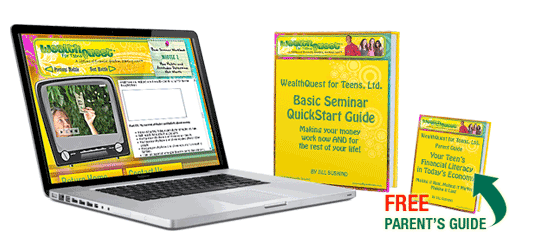

I have mixed feelings about this review.  First of all, I really like the way the components were laid out. The online video itself includes the video teaching and examples (on the left of the screen below), and an interactive notebook (on the right of the screen).  I haven't seen this with any other programs, and I really liked it.  My son watched the videos, paused them when prompted to do so, filled in the information in the interactive notebook, and resumed the video.  This is a great way to study and learn! A few times he got a little lost, and there was no way to rewind, but the video segments were not terribly long so we just started the segment over again.


There is an option to print the interactive notebook:


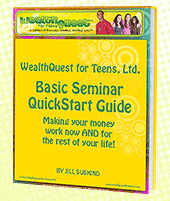
In addition, there is an eBook:  the Basic Seminar QuickStart Guide, which is used for implementing the program after watching the videos.  The purpose of the WealthQuest for Teens program is to have teens actually change their habits during the course, not to just read about good money habits.  With that purpose in mind, the QuickStart eBook guided us through setting up the money tracking system and setting goals for what my teen wants to accomplish with his money.  It has 30 short daily assignments, so that within a month, the teen is all set up and using the new system.  All of this worked together very well.  The eBook is a great reinforcer and implementation tool for what the student has just learned through the videos.

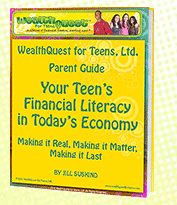
I also received the Parent Guide in eBook form.  It had great information in it not only on how the program works for teens, but also about common mistakes parents make in teaching about money, better ways to handle the topic, and how to handle allowance and jobs at home, which is a question many homeschooling parents have asked me!


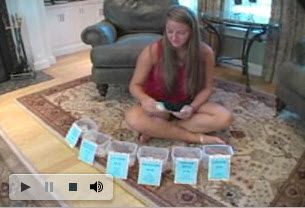
Here is a picture of a girl using the "Silo System" that is laid out in WealthQuest for Teens.  We are using envelopes rather than larger containers like this.  The system is completely adaptable to what works best for you.


Finally, we were given a link to Money Trail, an online tool specifically for managing kids' money.  We set up a child account and a parent account, so that my son can manage his money and I can track what he is doing through my account.  Money Trail does not actually hold any of your money; it is simply a tracking tool.  It is set up to deposit my son's allowance amount each Friday into his virtual account in the "Bank of My Parents," and we have it specifically set up to automatically divide the money he receives each week into "spend," "share," and "save" accounts.  He can then track money he receives and money he spends to see where it is going over time.  Money Trail also has a mobile version, so he can use it on his iPod Touch.

I agree with the author of the WealthQuest program, Jill Suskind, that it is very important to teach our teens about how to manage money.  I like her approach, teaching that your financial success is more dependent upon your beliefs, attitudes, and habits about money than on the actual size of your salary.  The program is not a "health-and-wealth-gospel" program or a "get-rich-quick" idea.  Rather, it teaches the importance of managing the money that you have well, no matter how much it is.  I like the inclusion of the "QuickStart Guide" and the Money Trail site, so that by the time the student completes the program, he is already implementing the system and managing whatever money he has.

The reason I have mixed feelings about this program is that in listening to the videos, even though the goal is to manage whatever money you have rather than to just "get rich," I still feel that the overall message of the program is that financial success is paramount.  The students are told that they need to regularly read books about financial success and spend a great deal of time thinking about money.  This can be taken several ways.  Obviously, the program is about money, so perhaps all this has a place.  People whose goal is service over "getting rich," such as missionaries, perhaps need the most training in managing money.  This program offers excellent tools and habits, including habits of giving to worthwhile causes and "making a difference."  Still, though, the more I listened to it, the more I was concerned that it would influence my children to think that money is the most important priority in our lives - or that the freedom provided by having money is.  It just isn't quite the worldview that I want to be coming from when I teach my children about money.  I am always concerned that my kids may be too easily influenced by things like that.  Then again, I probably don't need to worry too much about my teen being wrongly influenced, because when I asked my son what he thought of the program, he said basically the same thing that I just did!

The bottom line is that the WealthQuest for Teens program teaches great habits about money, and while you may need to make sure you emphasize your own worldview while teaching it, it is nonetheless a unique and valuable tool for teaching teens about how to manage money, which is an absolutely necessary pursuit in today's world.

Here are the basics:

The Product  WealthQuest for Teens
Author  Jill Suskind
Ages  14-19 - can be used with older students, worked fine with my 13-year-old
Price  $39.95

Click the banner below to see what my teammates thought of WealthQuest for Teens.

Photobucket

Disclaimer:  I received WealthQuest for Teens at no charge for the purpose of a fair review.  No other compensation was given, and all opinions are my own.
When I participated in the September Wordart Challenge at STO (see post here) I used the "Pumpkin Spice" Kit, which had not yet been publicly released by Dandelion Dust Designs.


"Pumpkin Spice" is now available exclusively at ScrapTakeout.


If you like the kit, download your free QP from Mediafire, for PU only.  If you'd like some other quickpages from this kit, click here.


Happy Fall, Y'all!  :-)

Disclaimer:  I received a free copy of the "Pumpkin Spice" Kit in exchange for layouts.